Git is a essential part of the developer’s learning and professional journey. The better they understand how Git Works the better their personal and professional life will be.
1. What is Git?
Git is a distributed version control system (DVCS) designed to track changes made in source code and other files during software development, which helps us to understand what changes were made at each step.
To explain Git in layman language, we can refer it to as a tracker. A tracker that tracks the changes made in the code. But remember the technical term for this tracker is VCS (Version Control System).
We are using the word “Distributed” because it is decentralized, i.e The repository (This term is explained in the later section) is distributed across all developers
A type of version control system where every developer has a full copy of the project and its complete history on their own machine. But the real question is, why Git was introduced?
The VCS was first introduced for developers to track their own codes, to keep a track of what changes they made at every step. It keeps the history of all the changes ever made in the source code.
2. Why Git is used?
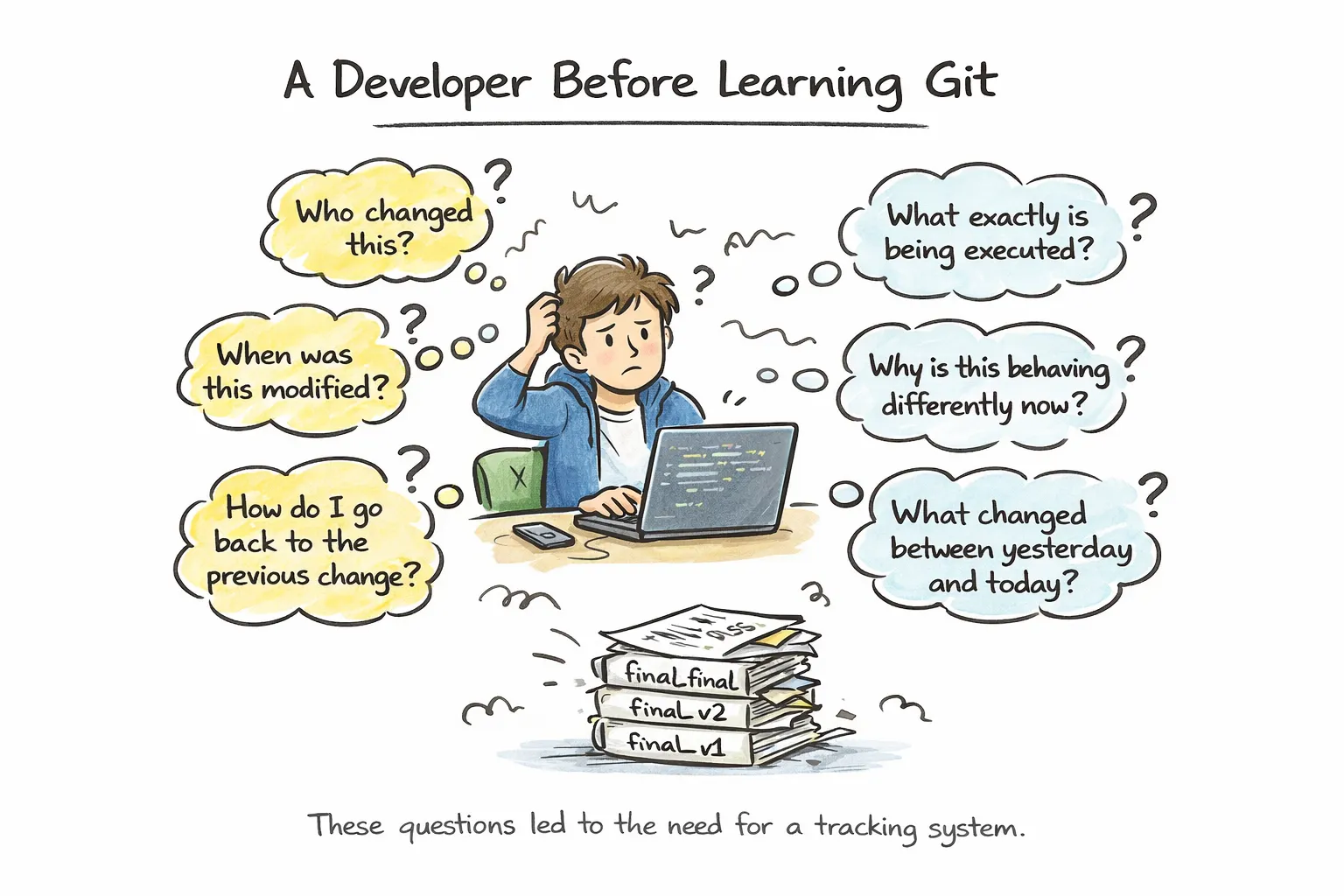
To understand why is it used, let’s say you don’t use it. How would you manage the development process as an individual and a team member?
We can first discuss about the problems faced in the early days of the development and how it was solved step by step:
What if there’s a part of the project you need help with, what will you do?
You will zip the source code and share with your friend, they’ll make changes and give you the source code back.
You open that code just to find some multiple lines of code and you can’t seem to understand what was exactly added and which part of your code was removed.That is where people thought of creating some kind of tracker to keep with the source code which will keep notes of all the changes made in the code.
Notice that the other problem is that only one person can code at a time.
How can we come back to the previous change that we made?
These are just some of the problems we could solve using a tracker, and that tracker is nothing but the Git that we use.
3. Git Basics and Core Terminologies?
To understand how this process of tracking works, we will understand some of the basic terms involved to actually visualize what is happening behind the scene.
Staging Area
When working on a project there can be multiple things we need to work on, we don’t just make every change permanent, that is where we use staging area.
If there are 5 different files being modified but i am only sure about the 3 files that has been correctly modified, i would say those 3 files are completely ready to be part of my final project. That is when i would put those files aside to be included in that final step, and the place where i keep my these files is what we call the staging area.
What is it?
This is the in between location where the files are stored before saving permanently.Why exist?
It helps developer control, and decide what goes in the final change.How it’s used?
Not everything is saved at once, we select some of the changes first and move that to the staging area.
Repository
Apart from the source code itself, i want a place where i can list every changes i make in the source code.
What is it?
The place/Location where git tracks every change. It’s like a diary to note down all the important events.Why does it exist? I
t exists to create a boundary for Git to know exactly what to track and what not to. We need a place to store the changes.How it’s used?
We start storing the code in it, and while storing the code we keep on storing all the changes. All the Git actions happen inside the repository.
Commit
This is the final step after the staging area that makes sure that whatever changes I saved in the staging area would now actually be included in the final project. This step ensures that the selected changes are recorded in Git’s history. All these actions happen inside the Repository.
What is it?
This is the checkpoint of the changes. This is where we note down the change.Why exist?
This step helps us have history of all the changes.How it’s used?
After we save them in the Staging area, we save them as commits.
4. Common Git Commands?
All of the above points tells us, why we need Git and how it actually works. So, Now the main question is how are we going to tell all this to Git to do this. How does the Git know what to track, how much to track? This is where the commands come into the picture. we made some phrases, those phrases are understood by our Git and then Git does the job. This “Phrases” are nothing but commands in technical terms (we developers love fancy names).
There are number of commands, each having a particular job to do. These commands helps us tell Git exactly how much it needs to track currently.
Let us now discuss some of the Common commands:
git add
As we discussed before about moving the ready to commit file to the staging area first. So, how do we do that? How am i going to tell the Git that these are files that are completely ready to be the part of the main project.
We will use the command to tell the Git to REMEMBER the current change i made.
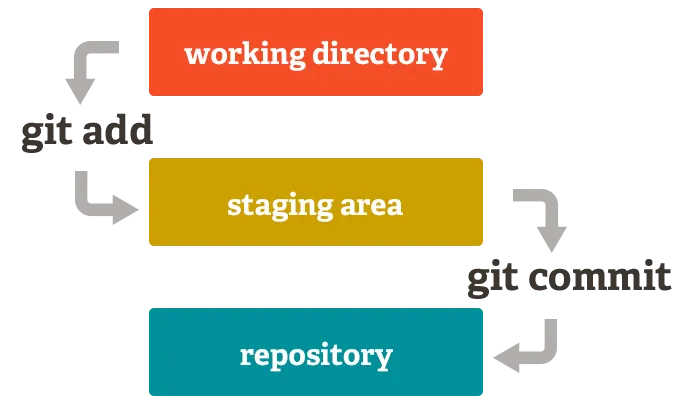
What it does? This particular command tells Git to remember the change that we made. It does not make any changes in the main project file, so it is not being executed in the project. Basically, It moves the selected changes from the working directory to the staging area.
when to use it? We use this after we make the changes and we are sure about that change being part of the main project.
git commit
This Particular command tells Git to look at the staging Area and asks it to move every changes present in the staging area to the main project.
what it does? It moves all the changes from the staging area to the main project. This saves the change permanently.
When to use it? when there are changes present in the staging area.
git status
This particular command is used to check what in particular is going on currently.
what it does? It does as the name suggest, the status of the project. It focuses on the ongoing work, and lets us know if there is anything to commit.
when to use it? when we want to check what we have added till now and what is there to commit.
git log
This particular command is used to check the history of all the commits.
What it does? Gives the history of every permanent changes, i.e every commits that we made in the project. It tells us how the project has evolved over time.
When to use it? When we want to look at previous commits, and we want data related previous changes.
These are some of the more commands that you can understand through the image:
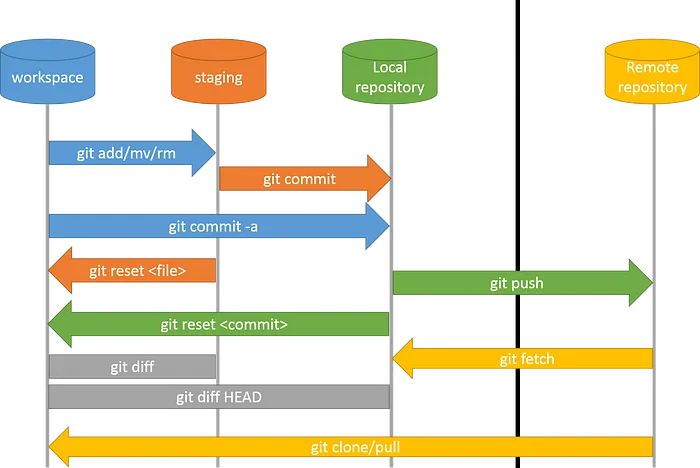
This image can help you visualize how the whole process of Git happens. This is how exactly each change that we make permanently gets added in our project.
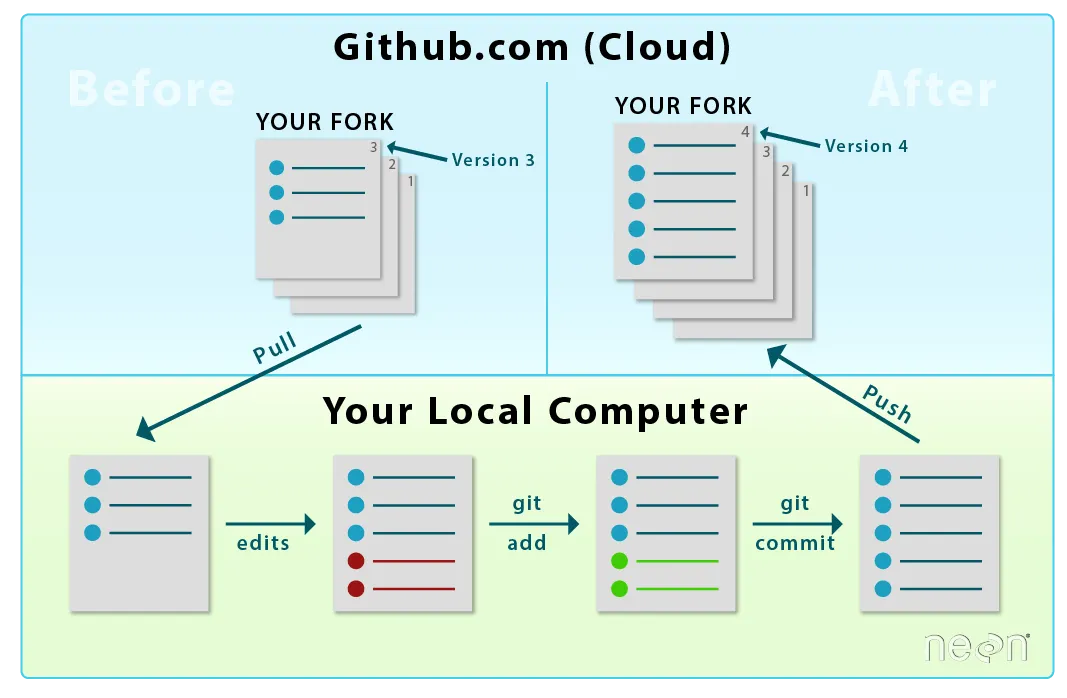
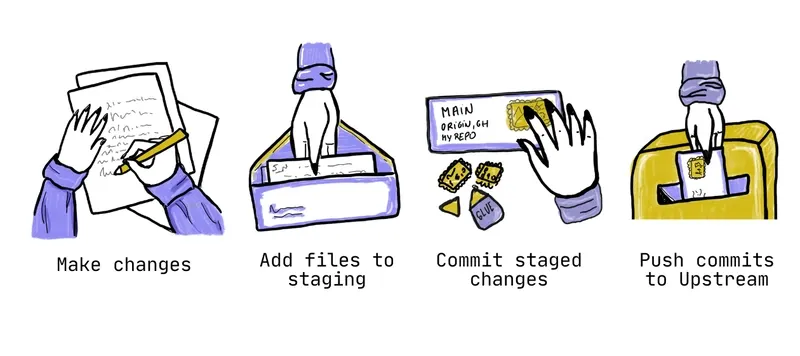
This image can be taken as a real life example that we can relate to the Git workflow: